
Disposable Pixels: The Future of AI-Generated Data Visualization
A Different Kind of Chart
Remember the first time you realized you could pass structured data to an image model and get back something that looked like a chart? No Matplotlib. No Plotly. No Streamlit server running somewhere. Just a prompt and an image.
That moment surprised me. Not because the chart was perfect, but because it was recognizable. It had the right shape, the right labels, the right proportions. It felt like something shifted.
This isn’t a tutorial. I’m not here to teach you how to do this. What I want to do is think out loud about something that feels like it’s about to change how analysts and BI developers work.
Quick Context: What Is Nano Banana Pro?
Google launched Nano Banana Pro, an image generation model built on Gemini 3 Pro. You might think the big deal is artistic generation capability, but that’s not what’s interesting for data work.
What matters is two specific properties that earlier image models didn’t have reliably: it renders legible, accurate text inside images, and it understands structured data well enough to turn described numbers into something that looks like a real visualization. That combination opens the door.
A model that can’t render “Q3: $4.2M” accurately in a chart is useless for this work. Nano Banana Pro largely can. And now Nano Banana 2, the Flash-speed successor, just launched from Google. Things are getting better, and they’re getting faster.
The Core Idea: The Model as a Rendering Engine
Here’s the conceptual shift, and it matters. In a Text-to-SQL workflow, once you have query results, you need something to render them. Today that something is always a chart library or a BI tool. Plotly, Power BI, Tableau, Looker. Always.
But what if it didn’t have to be? What if you just described the chart, the data, the style, and the model drew it?
I’m not talking about replacing Power BI. That’s not the conversation. I’m asking a different question: for conversational, ad hoc, one-shot visualization, the kind where someone asks “what did sales look like last quarter?” and you want an answer in seconds, does it matter whether the chart is rendered by Plotly or generated as an image?
Let me introduce a term I want to use throughout: artifact visualization. Or “disposable pixels.” These are visuals that exist for a single answer to a single question. They’re not live. They’re not interactive. They’re not governed by row-level security or refresh schedules. They’re meant to be read once and replaced next time someone asks something different.
Let’s See It: Real Examples
Here’s where abstract becomes concrete. I’m showing you four real examples. For each one, you’ll see the prompt I used (JSON-structured because that’s how a real pipeline would pass data to the model), the image it generated, and my honest take on whether it worked.
Example 1: Bar Chart Over Time
This is the clearest demonstration of the core idea.
{
  "chart_type": "bar",
  "title": "Monthly Revenue – Q1 2025",
  "x_axis": "Month",
  "y_axis": "Revenue (CAD $M)",
  "data": [
    { "month": "January", "value": 3.2 },
    { "month": "February", "value": 4.1 },
    { "month": "March", "value": 5.7 }
  ],
  "style": "professional, white background, teal bars, clean sans-serif font"
}
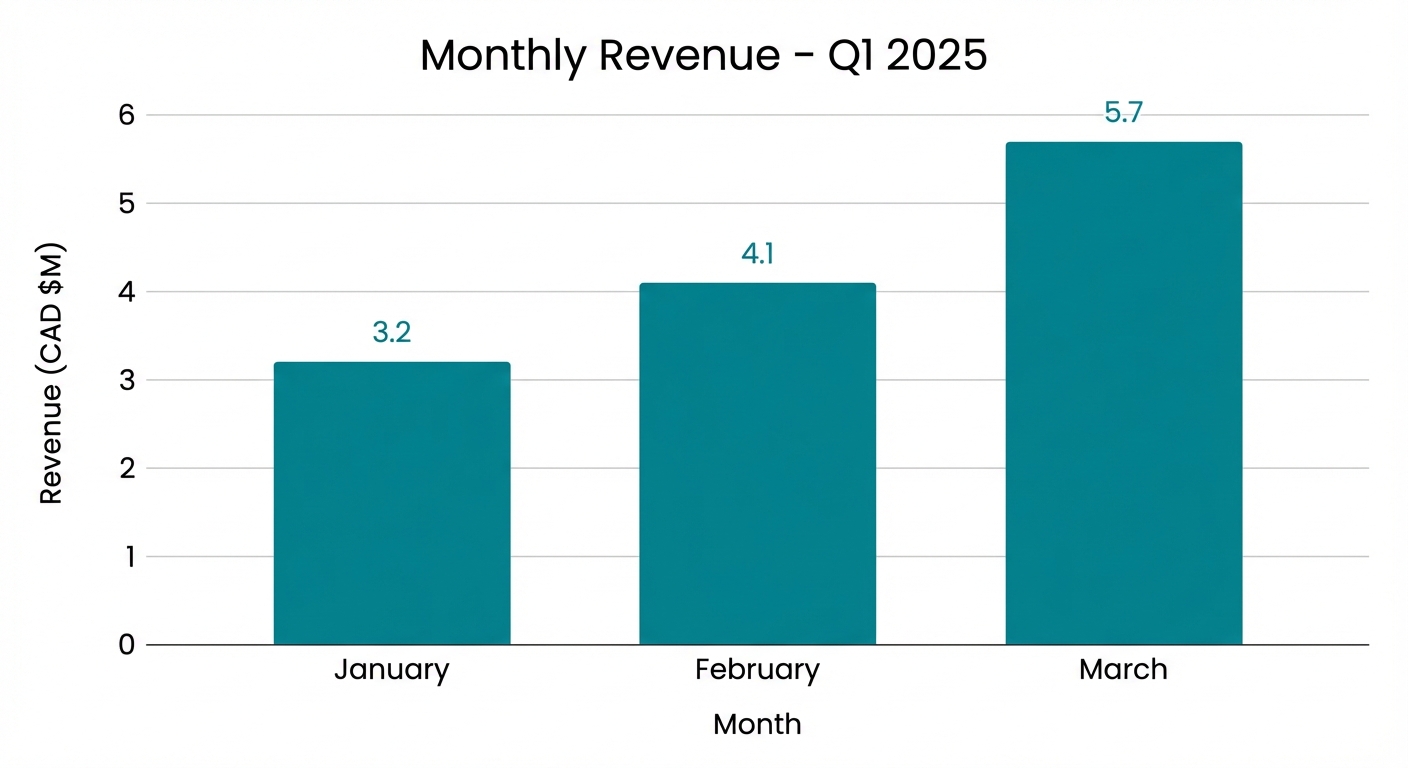
What it got right: proportions, labels, readability. The bars scale correctly relative to each other. The font is clean. The teal colors are exactly what I asked for. What it got wrong: minimal. This is a solid example.
Example 2: KPI Summary Card
Now let’s push into something less traditional. A single “slide” style image: one big headline number, a supporting metric, a small sparkline or trend arrow. The kind of thing you’d drop into a Teams message or a management email.
{
  "chart_type": "kpi_card",
  "title": "Total Revenue – March 2025",
  "layout": "single_card",
  "style": "clean, professional, white background, white text, teal accents",
  "primary_metric": {
    "label": "Monthly Revenue",
    "value": "$5.7M",
    "font_size": "large",
    "position": "center"
  },
  "supporting_metric": {
    "label": "vs. February 2025",
    "value": "+39%",
    "direction": "up",
    "color": "green"
  },
  "sparkline": {
    "label": "Jan–Mar 2025 Trend",
    "data": [3.2, 4.1, 5.7],
    "color": "teal",
    "position": "bottom"
  }
}
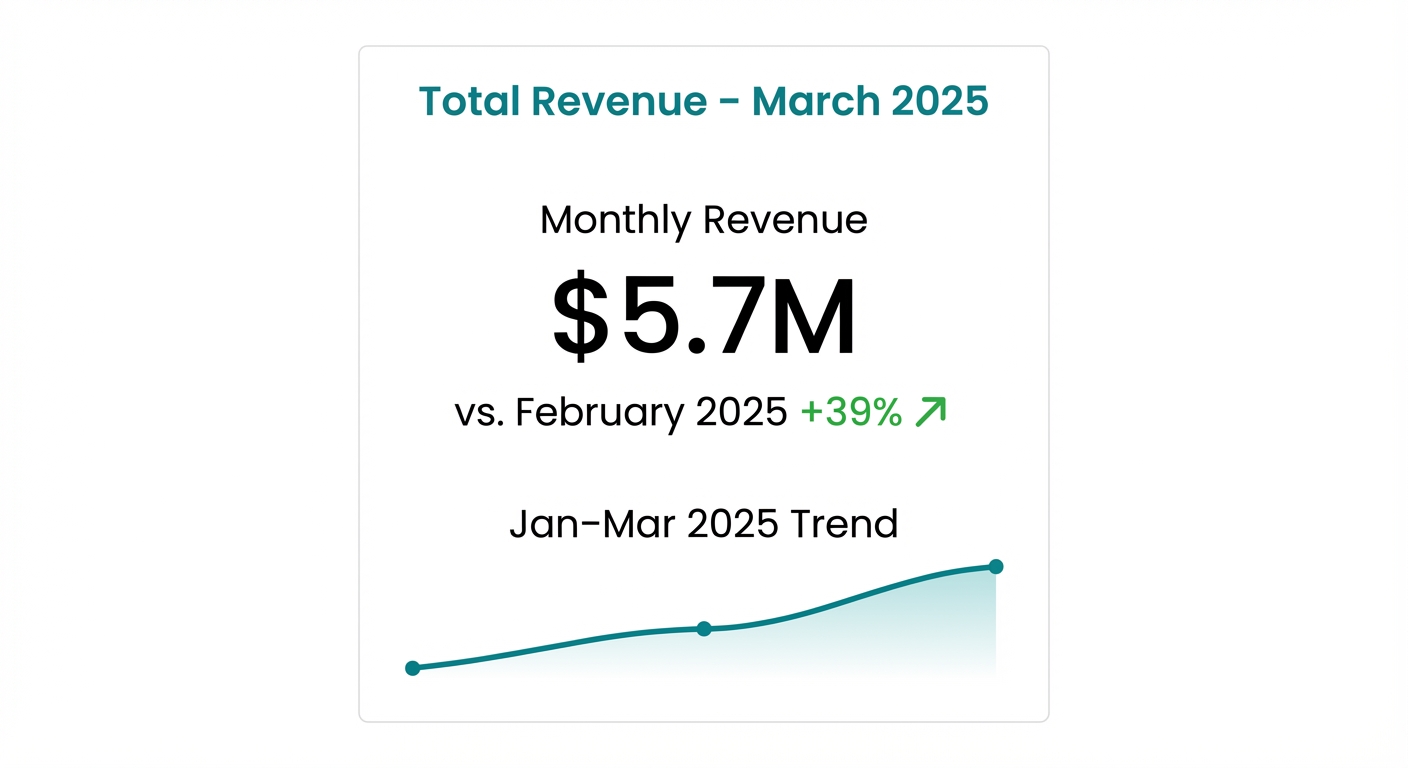
This is where you start to see versatility. The model isn’t just drawing bars anymore. It’s composing a layout. Numbers, color, hierarchy, whitespace. It works.
Example 3: Multi-Metric Infographic Panel
Push further. Two or three metrics, a chart, a headline insight. This is closer to a mini executive summary. This is where you see both the potential and the current ceiling.
{
  "chart_type": "infographic_panel",
  "title": "Q1 2025 Sales Executive Summary",
  "layout": "three_column_with_chart",
  "style": "professional, white background, dark text, teal and slate blue accents, clean sans-serif font",
  "headline_insight": "Q1 closed 22% above target, driven by the West region's strongest quarter on record.",
  "kpi_cards": [
    {
      "label": "Total Revenue",
      "value": "$13.0M",
      "change": "+22% vs. target",
      "direction": "up",
      "color": "green"
    },
    {
      "label": "Top Region",
      "value": "West",
      "change": "$5.7M - 44% of total",
      "direction": "neutral",
      "color": "teal"
    },
    {
      "label": "New Customers",
      "value": "214",
      "change": "+18% vs. Q4 2024",
      "direction": "up",
      "color": "green"
    }
  ],
  "chart": {
    "chart_type": "bar",
    "title": "Revenue by Region",
    "x_axis": "Region",
    "y_axis": "Revenue (CAD $M)",
    "data": [
      { "region": "West", "value": 5.7 },
      { "region": "East", "value": 3.8 },
      { "region": "Central", "value": 2.1 },
      { "region": "North", "value": 1.4 }
    ]
  }
}
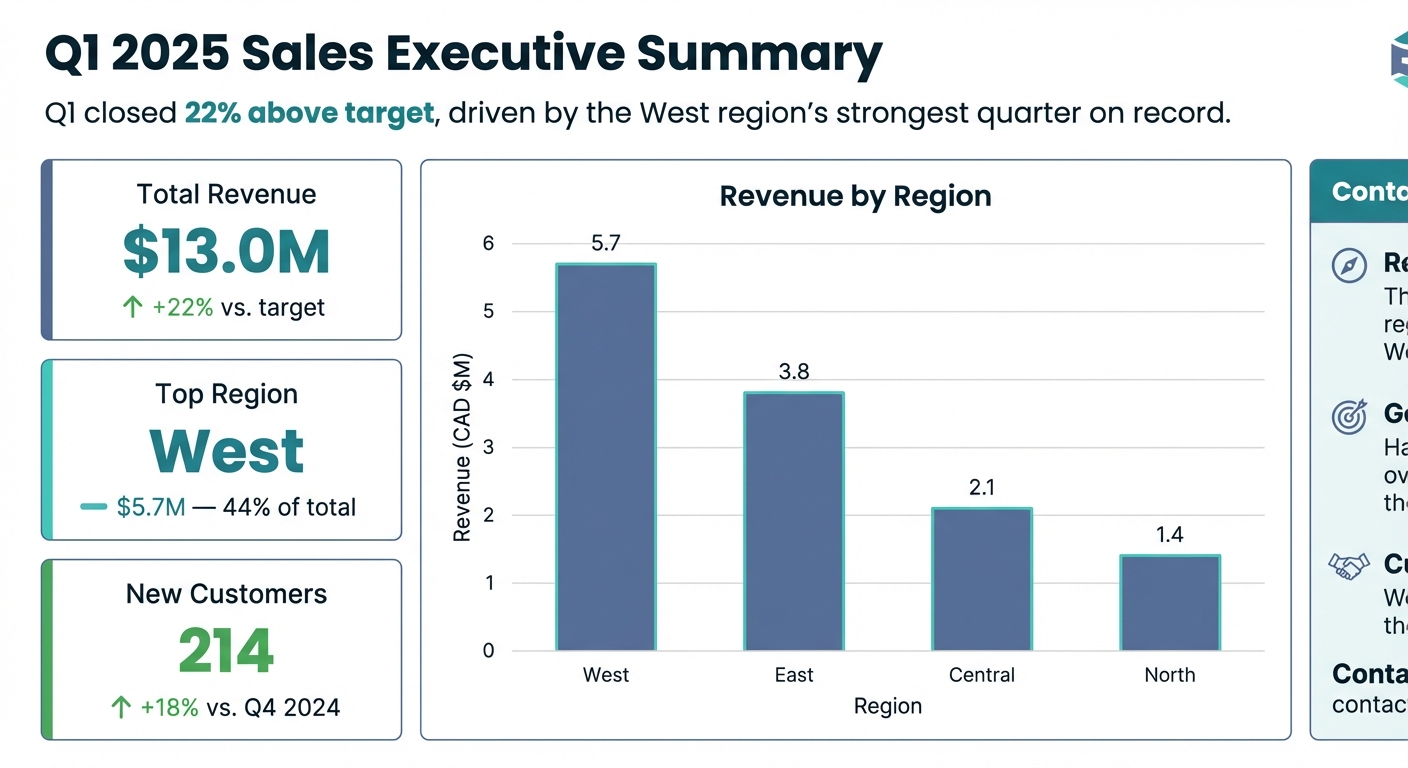
This one is impressive. You’ve got text, numbers, metrics, a chart, color coding, all composed into a coherent visual. The model handles it well. Not perfect, but compelling.
Example 4: The One That Didn’t Work Great
Here’s the honest part. Not everything lands perfectly.
{
  "chart_type": "multi_line_chart",
  "title": "Weekly Revenue by Product Category – Q1 2025",
  "x_axis": "Week",
  "y_axis": "Revenue (CAD $M)",
  "style": "professional, white background, distinct color per line, include data point labels on every point",
  "data": [
    { "week": "W1",  "Hardware": 1.2, "Software": 0.9, "Services": 0.6, "Consulting": 0.4, "Support": 0.3 },
    { "week": "W2",  "Hardware": 1.4, "Software": 1.1, "Services": 0.7, "Consulting": 0.5, "Support": 0.3 },
    { "week": "W3",  "Hardware": 1.1, "Software": 1.3, "Services": 0.9, "Consulting": 0.6, "Support": 0.4 },
    { "week": "W4",  "Hardware": 1.6, "Software": 1.2, "Services": 0.8, "Consulting": 0.4, "Support": 0.5 },
    { "week": "W5",  "Hardware": 1.3, "Software": 1.5, "Services": 1.1, "Consulting": 0.7, "Support": 0.4 },
    { "week": "W6",  "Hardware": 1.8, "Software": 1.4, "Services": 1.0, "Consulting": 0.8, "Support": 0.6 },
    { "week": "W7",  "Hardware": 1.5, "Software": 1.6, "Services": 1.2, "Consulting": 0.9, "Support": 0.5 },
    { "week": "W8",  "Hardware": 2.1, "Software": 1.7, "Services": 1.1, "Consulting": 0.7, "Support": 0.7 },
    { "week": "W9",  "Hardware": 1.9, "Software": 1.9, "Services": 1.4, "Consulting": 1.0, "Support": 0.6 },
    { "week": "W10", "Hardware": 2.3, "Software": 2.0, "Services": 1.3, "Consulting": 1.1, "Support": 0.8 },
    { "week": "W11", "Hardware": 2.0, "Software": 2.2, "Services": 1.6, "Consulting": 0.9, "Support": 0.7 },
    { "week": "W12", "Hardware": 2.5, "Software": 2.1, "Services": 1.5, "Consulting": 1.2, "Support": 0.9 }
  ],
  "annotations": [
    { "week": "W4", "label": "Campaign Launch", "category": "Hardware" },
    { "week": "W9", "label": "Contract Renewal Window", "category": "Consulting" }
  ]
}
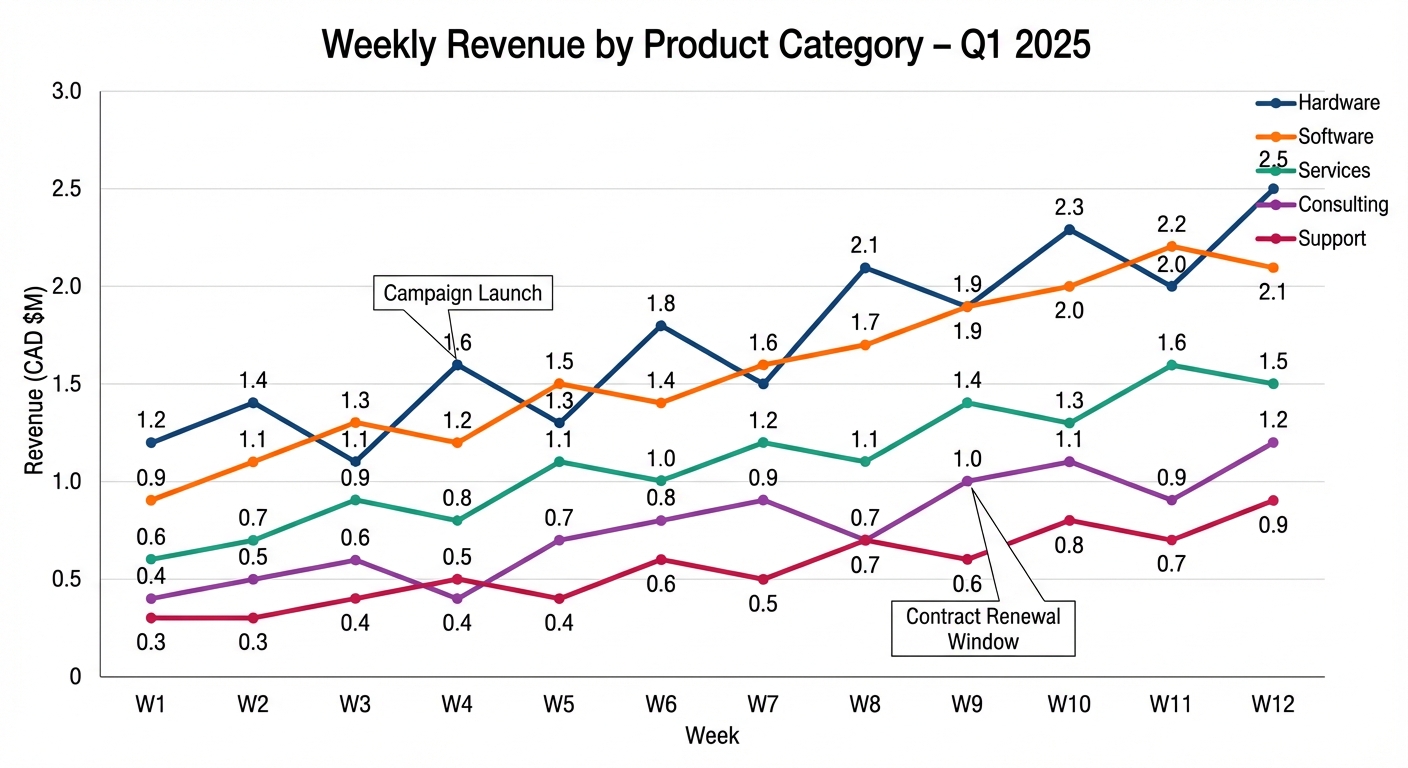
The axis labels got crowded. Some of the data point labels overlap. The colors are distinct, but the chart feels busy. This is the moment where you realize the model is still learning. It can handle complexity, but it doesn’t always choose simplicity when simple would be better.
This is your “always verify” moment. You don’t take a data-driven output at face value just because it looks professional. The model did the work, but you still need to check it.
Where This Fits (and Where It Doesn’t)
Let me be clear about the boundaries.
This is not a Power BI replacement. It’s not even trying to be. The moment you need interactivity, drill-through, row-level security, or a live refresh that updates every hour, you need a real BI layer. Nothing about this workflow changes that.
Where it does fit:
- Conversational analytics. Inside a chat interface, someone asks “show me X” and you return a visual answer, not just a table.
- AI assistants that need to return something visual, not just text. A chart is more persuasive than a table.
- Ad hoc stakeholder snapshots that live in a Slack message or email. Disposable. Quick. Done.
- Rapid prototyping. What would this dashboard look like? Generate a few variations and see which resonates.
Think of it as the difference between a printed snapshot and a live dashboard. Both have a place. One is for communication. The other is for exploration.
What Future Models Will Unlock
This is the interesting part. Right now Nano Banana Pro is impressive but imperfect. Complex data still causes problems. A model might misinterpret information or produce factually incorrect results. Google DeepMind has been transparent about this limitation. It’s real.
But look at the trajectory. The jump from the original Nano Banana to Pro was significant on text rendering and data accuracy. Nano Banana 2 brought that Pro-level quality at Flash speed. The direction is clear.
What becomes possible when the model is reliably accurate on data?
- Dynamic chart generation inside chat interfaces. Ask a question, get a visual answer, no frontend required. Just a conversation.
- Slide deck generation from a query result. Pass a structured JSON payload, get a properly formatted presentation slide back. Every slide uses the same brand colors, the same font, the same hierarchy.
- Embedded visualization in AI agents. Your analytics agent doesn’t just return text. It returns a rendered artifact. Visual, immediate, no rendering server needed.
- Localized reporting. Nano Banana Pro already supports text rendering in multiple languages, meaning you could generate a chart with French labels for Quebec stakeholders and English labels for everyone else, from the same data, in the same pipeline.
The piece that still needs to mature is factual reliability on numbers. When that’s solved, and based on the current pace it will be, the use case becomes much stronger.
The Chart That Draws Itself
Come back to the opening moment. The reason this feels different isn’t the technology. It’s the shift in mental model.
For fifteen years, “visualizing data” meant choosing a tool and building something. You picked Tableau or Power BI or Plotly. You spent time configuring it. You deployed it.
What’s emerging is a world where you describe what you want to see and the model renders it. That’s a small conceptual shift with large practical implications for anyone building on top of data.
For people building Text-to-SQL pipelines, this is a natural next layer. The query generates the data. The model generates the visual. The human just asked a question in plain English.
We’re not fully there yet. The model still needs to get better at accuracy. The legal and compliance stories still need to mature. The workflow still needs some friction removed.
But we’re close enough that it’s worth paying attention now. Not next year. Now.